Customizing the SchemaTable of Contents
Table of Contents
Both HydraAdmin and OpenApiAdmin
use introspection of the API schema to discover its capabilities, like filtering and
sorting.
They also detect whether the API has real-time capabilities through Mercure. When it does, Admin enables real-time updates automatically.
API Platform Admin also has native support for the popular Schema.org vocabulary. This support lets it automatically use the field type matching your data, or display a related resource’s name instead of its IRI.
# Adding Filtering Capabilities
You can use the QueryParameter attribute on an API
Platform resource to configure a filter on a property.
For instance, here is how configure filtering on the id, title and author properties of a
Book resource:
<?php
// api/src/Entity/Book.php
namespace App\Entity;

use ApiPlatform\Doctrine\Orm\Filter\ExactFilter;
use ApiPlatform\Doctrine\Orm\Filter\PartialSearchFilter;
use ApiPlatform\Metadata\ApiResource;
use ApiPlatform\Metadata\QueryParameter;
use Doctrine\ORM\Mapping as ORM;

#[ApiResource(
    parameters: [
        'id' => new QueryParameter(filter: new ExactFilter()),
        'title' => new QueryParameter(filter: new PartialSearchFilter()),
        'author' => new QueryParameter(filter: new PartialSearchFilter()),
    ]
)]
#[ORM\Entity]
class Book
{
    // ...
}
If you are using the guessers, the Admin will automatically update the Book list view to include a filter on the selected properties.
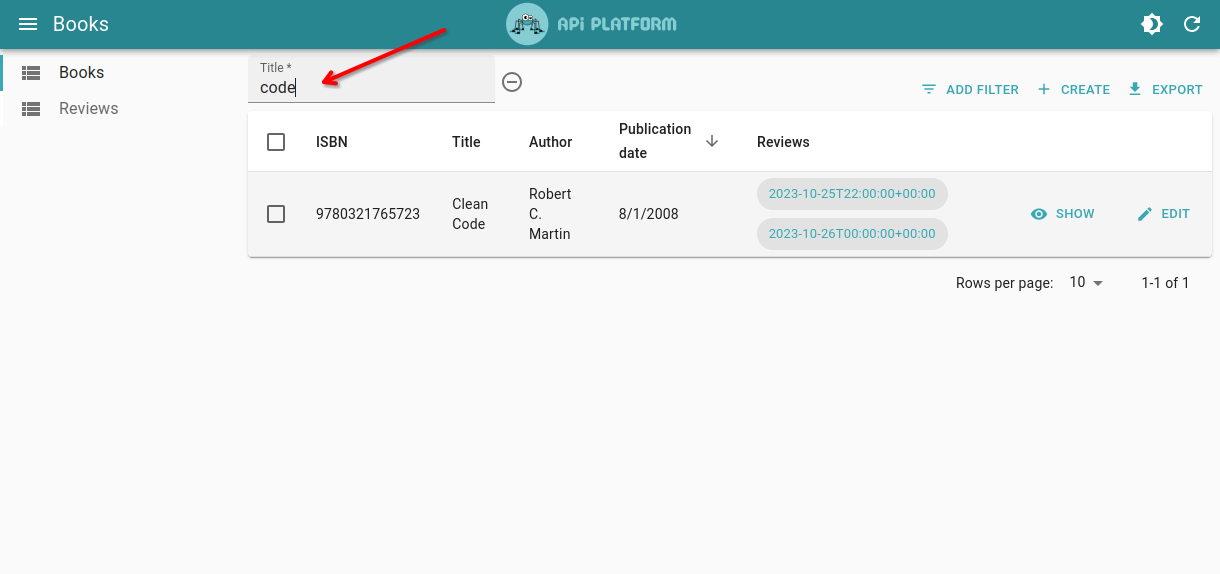
Tip: Learn more about the available filters in the core documentation.
# Adding Sorting Capabilities
You can also use the QueryParameter attribute on an API
Plaform resource to configure sorting.
For instance, here is how to configure sorting on the id, isbn, title, author and
publicationDate properties of a Book resource:
<?php
// api/src/Entity/Book.php
namespace App\Entity;

use ApiPlatform\Doctrine\Orm\Filter\SortFilter;
use ApiPlatform\Metadata\ApiResource;
use ApiPlatform\Metadata\QueryParameter;
use Doctrine\ORM\Mapping as ORM;

#[ApiResource(
    parameters: [
        'order' => new QueryParameter(filter: new SortFilter(), property: 'id'),
        'orderIsbn' => new QueryParameter(filter: new SortFilter(), property: 'isbn'),
        'orderTitle' => new QueryParameter(filter: new SortFilter(), property: 'title'),
        'orderAuthor' => new QueryParameter(filter: new SortFilter(), property: 'author'),
        'orderPublicationDate' => new QueryParameter(
            filter: new SortFilter(),
            property: 'publicationDate'
        ),
    ]
)]
#[ORM\Entity]
class Book
{
    // ...
}
If you are using the guessers, the Admin will automatically update the Book list view to make the selected columns sortable.
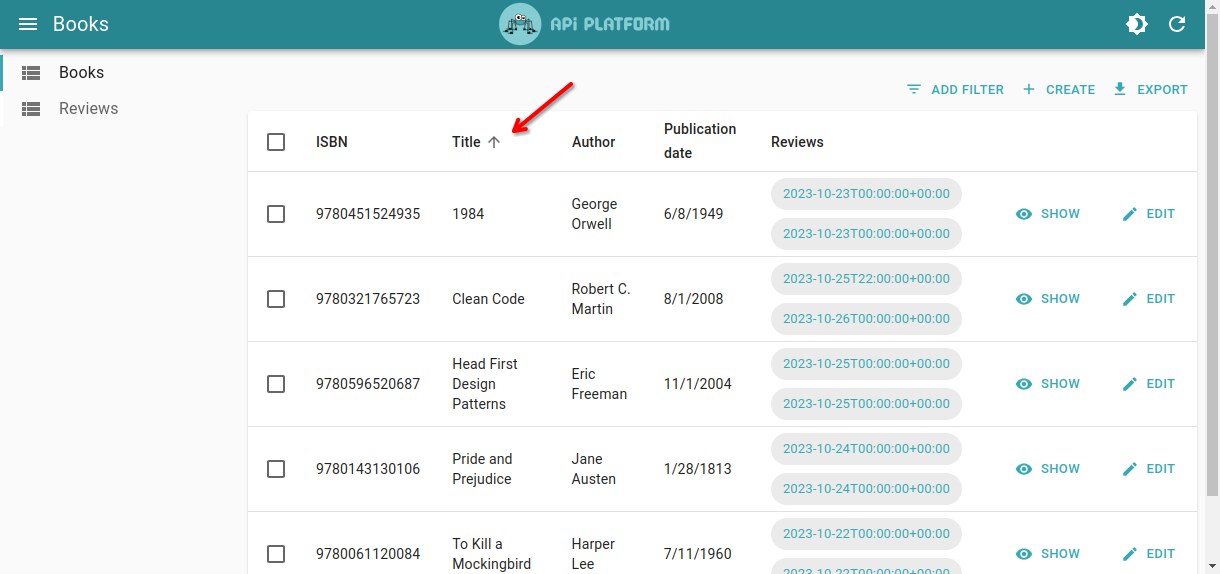
Tip: Learn more about the SortFilter in the
core documentation.
# Enabling Real-Time Updates
You can use the mercure attribute to hint API Platform that it must dispatch the updates regarding
the given resources to the Mercure hub:
<?php
// api/src/ApiResource/Book.php with Symfony or app/ApiResource/Book.php with Laravel
namespace App\ApiResource;

use ApiPlatform\Metadata\ApiResource;

#[ApiResource(mercure: true)]
class Book
{
    // ...
}
Make sure you have configured your dataProvider to support Mercure.
Tip: Learn more about how to use the Mercure Protocol in the API Platform Core documentation.
# About Schema.org
API Platform Admin has native support for the popular Schema.org vocabulary.
Schema.org is a collaborative, community activity with a mission to create, maintain, and promote schemas for structured data on the Internet, on web pages, in email messages, and beyond.
To use this capability, your API must use the JSON-LD format and the appropriate Schema.org types. The following examples use API Platform Core to create such an API. This feature works with any JSON-LD API that uses the Schema.org vocabulary, regardless of the web framework or programming language.
# Displaying Related Resource’s Name Instead of its IRI
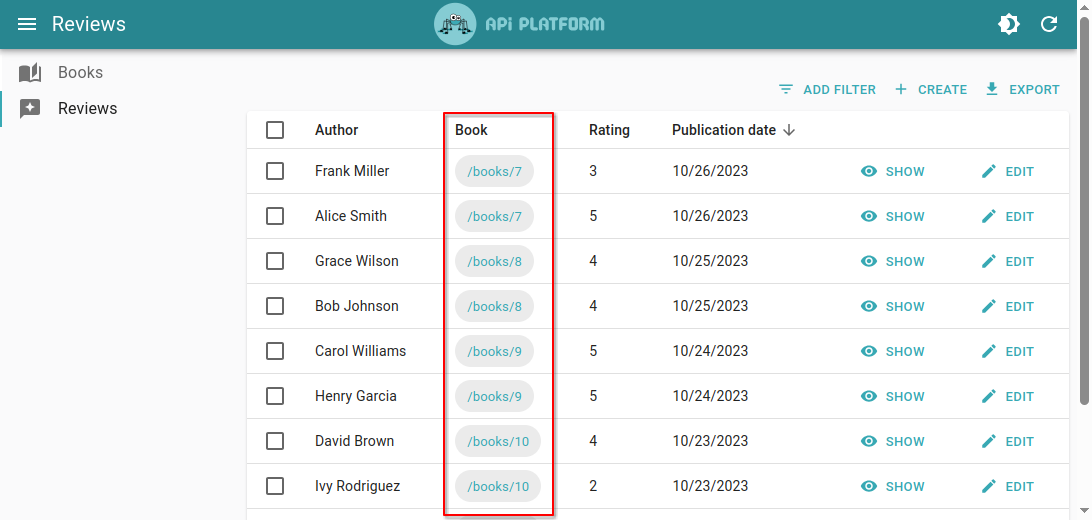
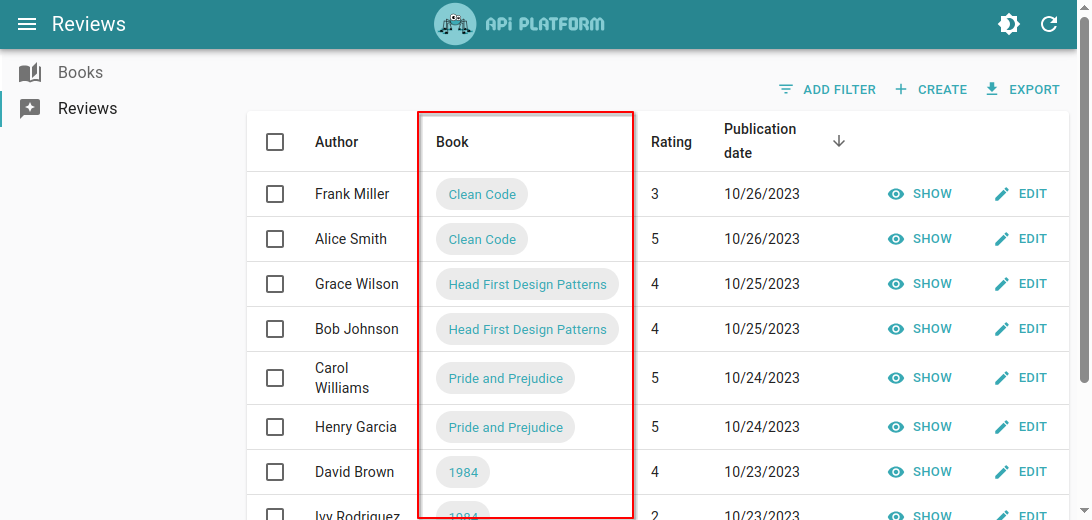
By default, IRIs of related objects are displayed in lists and forms. However, it is often more user-friendly to display a string representation of the resource (such as its name) instead of its ID.
To configure which property represents your entity, map the property that holds the name of the
object with the https://schema.org/name type:
// api/src/Entity/Person.php
...

#[ApiProperty(iris: ["https://schema.org/name"])]
private $name;

...| With IRI | With Resource Name |
|---|---|
 |  |
# Emails, URLs and Identifiers
Besides, it is also possible to use the documentation to customize some fields automatically while configuring the semantics of your data.
The following Schema.org types are currently supported by API Platform Admin:
https://schema.org/email: the field will be rendered using the<EmailField>React Admin componenthttps://schema.org/url: the field will be rendered using the<UrlField>React Admin componenthttps://schema.org/identifier: the field will be formatted properly in inputs
Note: if you already use validation on your properties, the semantics are already configured correctly (see the correspondence table)!
# Next Step
Learn how to tweak the generated Admin by Customizing the Guessers.
You can also help us improve the documentation of this page.
Using an AI coding agent? See the documentation index for LLMs at /docs/llms.txt.
